DIWUG Article
?A new DIWUG magazine has just been published with an article I wrote, really proud to have my first article in DIWUG.
Download DIWUG SharePoint eMagazine #15 (eReader Edition) Download DIWUG SharePoint eMagazine #15
?A new DIWUG magazine has just been published with an article I wrote, really proud to have my first article in DIWUG.
Download DIWUG SharePoint eMagazine #15 (eReader Edition) Download DIWUG SharePoint eMagazine #15
I have created a script to download all or specific content from Channel9 by using there RSS feed for a particular event. The script is inspired by a script that was published for the SharePoint conference in 2014. I have updated the script to work with any Channel9 RSS feed from an event.
The script takes 3 parameters
The script can be used like this: .\download-Channel9Content.ps1 -baseRSSfeedUrl “http://channel9.msdn.com/Events/SharePoint-Conference/2014" -downloadLocation “D:\SPC14” -filetypes mp3, slides, mp4high
Last week I had to copy a few vhd files to another blob storage. This can be done by downloading and uploading, although I have a nice internet connection this would take a few hours, so after a quick search on the internet I found a great blog from Michael Washam that had the PowerShell CmdLets to do this.
Just saw on the settings page of the SharePoint admin portal within Office 365 that the video portal is coming to my tenant J

It is enabled by default. I could not find a site or a template to create the video portal yet.
To get more information what the video portal is:
Update 18-11-2014: There is an official announcement that it is rolling out: http://blogs.office.com/2014/11/18/introducing-office-365-video/
A new feature in Azure Active Directory (AAD) is ‘Applications’. With this you can give users a single location to sign-in to more than 2100 cloud application. You can even add your own cloud apps. Your users can use this site to access the applications that they have access to: http://myapps.microsoft.com.
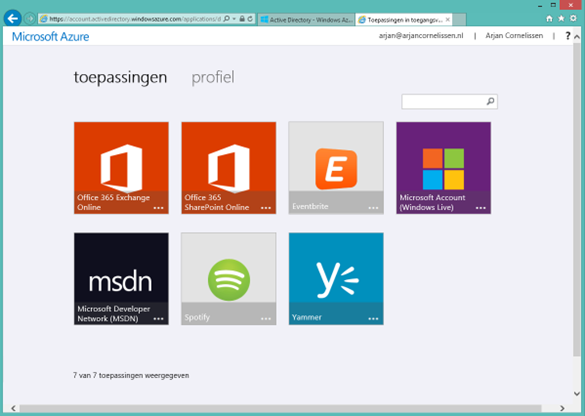
There are enterprise apps but also consumer apps like Spotify. To have a single-sign on experience there is client that needs to be installed to make it work. For the Office 365 apps this client is not necessary. With AAD Premium you have the possibility to update the login screen for the user. At the moment that the user goes from the login name field to the password field AAD checks if the user has be redirected to a custom login page (federated users) or can display a custom login page. This way you can give the user a ‘corporate’ login screen. To give this experience wright away the user can add the domain name behind the URL like http://myapps.microsoft.com/worktogether.tech. This way AAD knows the domain where the user wants to login to and displays this custom page
The last few of weeks I got a requests to create list views that where a bit nicer than the default views. Some requests were to display a certain text as a hyperlink or hyperlinks to display as a certain image, but I also got the request to make a view that did not look like a list view anymore. My colleague jumped on this to create a custom webpart to display this. After showing what the Client rendering could do he was convinced to do it with the client rendering.
I was triggered to write this blog because of a question on Facebook about changing the title of a content type in the content type hub.
I was able to answer this question because I found the same issue a while ago when I was working with the same thing.
The question was: When I create a content type in the content type hub and publish it, the content type is pushed down to all site collections and there you can use it in your lists and libraries. Now if we change the content type’s title or description and republish it, the changes are pushed down to the level of site collection but not to the content types associated to a list. When we create a new list the changes are visible for that new list.
Within SharePoint it is by default possible to open a list form in a dialog by just changing 1 setting on that particular list. This can be done by going to the settings of the list and choose for ‘Advanced settings’. Here you find the option ‘Dialogs’ where you can change this. 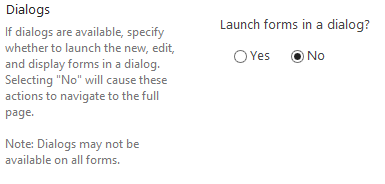
This is nice but sometimes you want that new form or some other page also in a dialog. That can be done with a little bit of JavaScript on the page where you want it.
For all the people that used SharePoint online knows that when you start using you get 4 site collections or is it 5? I have been using my environment for some time now. Let’s find out.
First start with the browser:
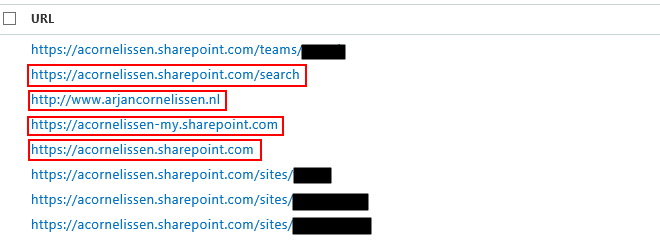
The sites in the red are the default sites. The one with the full domain name is the public and is by default http://-public.sharepoint.com
Let’s see if we can get some more sites with PowerShell.
?A few weeks ago I was asked to create a solution to copy a document in SharePoint to another system. This other system had the ability to receive documents and their metadata thru webservices. We have a policy that we only use Out-of-the-box solutions or the app model.
I knew that SharePoint 2013 Workflow no has the option to use webservices so I thought this is going to be an easy one. After some researching and trying I found out that the webservice actions in SharePoint Workflow can only handle REST webservices and not SOAP webservices.