Office-Dev-Pnp

Connect to SharePoint Online in Azure Automation app credentials

In this post, I want to take you with me how you can use app credentials in an Azure Automation script to connect to SharePoint Online. Many PowerShell scripts use a username and password, but these are less secure than using an app credential and can also be used to login to SharePoint Online in the browser. By default, connecting to SharePoint uses basic authentication and many companies are on route to disable this to make use of conditional Access and MFA.

SPS Paris and SPS Belgium

Last two weekends I went to SharePoint Saturday in Paris and Belgium. It is always great to meet other SharePoint and Office 365 consultants, customers and suppliers.

SPS Paris

The first weekend I went to Paris where I did not read my emails to carefully, so I was at the wrong venue. I was not the only one. It took some extra time to get to the new location. Arrived there I was just in time for the first session; this was a session about the secure score site from Microsoft. The URL of the Secure Score is http://securescore.office.com. Here you can log in with an administrator account and see what security settings you can do to make your tenant more secure. You need to be a Global Administrator, SharePoint Administrator, Exchange Administrator or Compliance Administrator to access it.

SharePoint Saturday Munich 2017

This year of SharePoint Saturday’s started with the one in Munich last weekend. This time there was also a preconference session on Friday. The sessions on Friday and Saturday were held at the brand-new building of Microsoft Germany.

Friday session

This year they organized two preconference sessions. A developer one about Office Dev PnP and an IT Pro about SharePoint 2016. I went to the SharePoint 2016 session where they talked about all the aspects of SharePoint 20116. They started with the architecture and the differences between SharePoint 2013 and 2016. They also explained where the issues were and how to solve them. After the architecture session we went into the authentication options within SharePoint and the hybrid identity. Here we looked at the identity options within Office 365 and the options to get your on-premises users into the cloud. Also, the dependencies where discussed like ADFS on-premises and your local internet line is down. After the lunch break we had a session about PowerShell and the Office Dev PnP PowerShell module that is available for on-premises and Office 365. We ended the day with setting up Hybrid. Thomas did a complete hybrid setup in just 1 hour with some preparations that he did on forehand. The most important part of the hybrid setup of Office 365 is that your identities are available in Office 365. When you have, that part done and your SharePoint farm can talk to the internet you can run a simple wizard from the SharePoint Online admin portal to setup the hybrid farm. This wizard will setup:
SharePoint Saturday Brussel October 15, 2016

Last weekend I visited SharePoint Saturday in Brussel Belgium. This was my fourth time here in Belgium and again a great one. The day was setup up 6 sessions of 50 minutes and a lunch break of 1.5 hours with a 30 minute.

We started at 9 with a welcome from the BIWUG team and the first session started short after that. I started with some developer sessions.

Get Typing with TypeScript

I started the day with a session from David Opdendries (@sharepointdavid)

Ignite 2016 Atlanta summary

Last week I had the privilege to attent Microsoft Ignite in Atlanta. This week was full of news, sessions and a lot of walking. Besides the sessions, this year the expo hall was large, I have spend a lot of time at the expo talking to venders, partners and Microsoft.

I have created a PDF from all my notes. On a few notes I have references to slides, the slides should be come available on https://myignite.microsoft.com/videos. On this site are also all the videos.

Term store import with Office Dev PnP

As a follow up on my post from last week I wanted to add some extra data in the terms. This is not possible with the default CSV import that SharePoint has. I mentioned in my previous post that Office Dev PnP has also an option to import terms. And with that option we can add a lot more than only the term itself.

What commands do we have?

We have a 2 options here to add term to Office 365.

Updated: Extension attributes in Azure AD

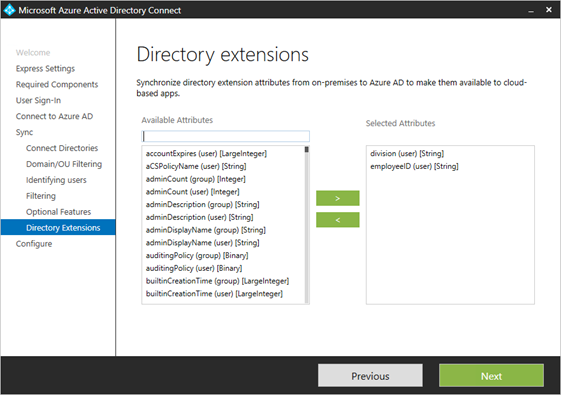
This week I had a customer that has some data in their on-premises Active directory that we needed to use for a custom application in SharePoint Online. This data was placed in the ExtensionAttribute field of the user. With the latest version of Azure AD Connect we have the option to select attributes to sync to Azure Active Directory and that is what the customer did. https://learn.microsoft.com/en-us/entra/identity/hybrid/connect/how-to-connect-sync-feature-directory-extensions

AD Connect wizard with Directory extensions This screenshot has selected division and employeeID, but in the complete list of available attributes there are also the ExtensionAttributes. When you do not select them here, the extension attributes will be in the synchronization.

SharePoint Saturday Netherlands June 11 2016

Two weeks after my visit to SharePoint Saturday Paris I visited SharePoint Saturday Netherlands. The schedule for today was a bit more relaxed than in Paris. We had 4 session slots of 75 minutes with great sessions and more time in between the sessions to have a chat with sponsors, trying out the HoloLens and playing some games. The HoloLens is a very cool device and I tried it here for the first time.

SharePoint Saturday Paris May 28 2016

On May 28th 2016 I visited SharePoint Saturday in Paris (http://www.spsevents.org/city/Paris/Paris2016/). The event was held in the Montparnasse Tower in the center of Paris on the 40th floor. We had an amazing view from that height.

This article contains my notes of the day.

Start of the day

We had some trouble getting in the building because of some regulations of the building owner, but when we were all registered we could go all the way up to the 40th floor. Here we started with a small breakfast, I did not eat in the hotel so I could use this. I came in just after 8 and all sponsors where getting settled because they also had trouble getting into the building. After breakfast and a delay of 15 minutes the first session started at 9:15

How to get the geolocation column

There are a number of blogs already written about how to get the Geolocation column on your SharePoint site, but a lot of sites use the wrong syntax for the field XML. Even the MSDN site for adding the geolocation column to your site is incomplete.

The correct XML to use is:

The important part here is the addition of the Name property in the field definition. The complete script to add it to your site is: